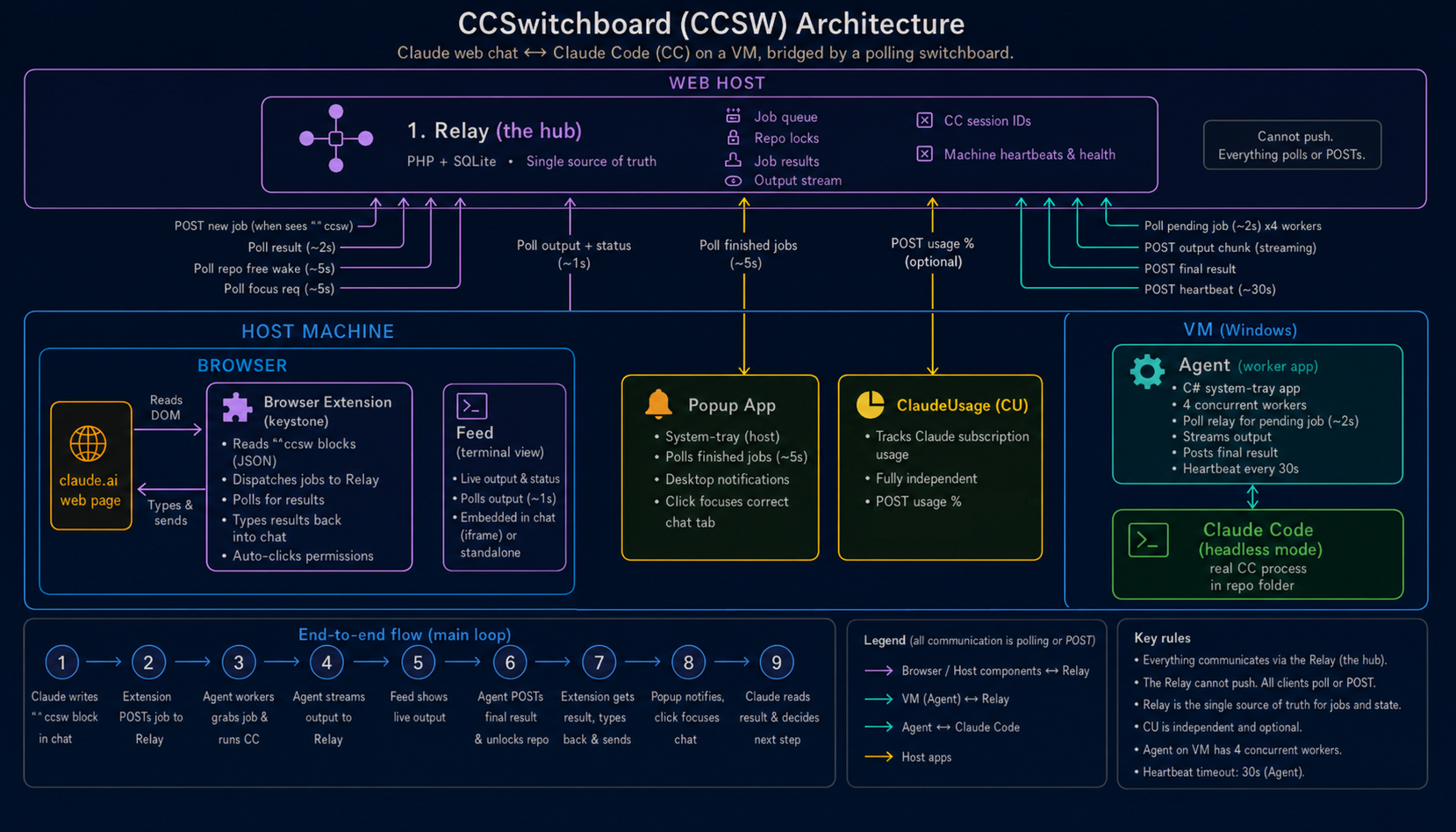
Here is the whole thing in one drawing, followed by a plain breakdown of each part: what it is responsible for, and exactly how it talks to the others. Keep one rule in mind while you read, because it explains everything else: no component ever calls another component. They only ever call the relay in the middle, on a timer, asking "anything new?" The relay is dumb PHP on shared hosting with no way to push, so everyone polls it.
The relay
Plain PHP + SQLite on dabblelabs.uk. The hub.
Holds everything in one small SQLite file: the job queue, the repo locks, results, per-thread Claude Code sessions, and the streamed output. Deliberately dumb - it just answers questions. Every other part polls it, and nothing talks to anything except the relay.
Endpoints it serves
POST job.phptakes a new job. Body{payload, thread, continue, readonly}; grabs the repo lock, returns{id}or a 409 if the repo is busy.GET poll.phphands the agent the oldest pending job and flips it to running in one step.POST result.phpstores a finished result and the Claude Code session id, then frees the lock.append.php / output.phpthe streaming pair: the agent appends each output line, the feed reads back everything newer than the last line it saw.wake.phpthe "repo free" nudge queue;register_tab.phpmaps a thread name to its browser tab;session.phplooks up a session id to resume.heartbeat.phpnotes the agent is alive;cancel.phpflags a job to be killed.
The agent
C# tray app on the VM. Runs the actual work.
A .NET tray app running four workers at once, so several jobs can be in flight. When it sees a job it spawns a headless Claude Code run for it and streams that run's output back line by line. It is the only part that ever launches Claude Code.
How it talks to the relay
- Polls
GET poll.phpevery 2s for a new job. - Runs
claude -p ... --output-format stream-jsonand posts each line toappend.phpas it arrives. - On finish,
POST result.phpwith the result and the session id (so a latercontinuejob can resume the same conversation). - Pings
heartbeat.phpevery 30s, and checkscancel.phpevery 2s while a run is live. - If a run goes silent for 90s it kills the process tree and marks the job timed out.
The browser extension
MV3 extension in Brave. The keystone.
Lives on the Claude.ai page. It reads Claude.ai's dispatch blocks straight out of the chat, sends them to the relay, and types results and wake prompts back into the input on its own. The fiddliest piece by a distance.
How it talks
- Finds a
ccswcode block by anchoring on the thumbs-up feedback button, which only appears under Claude.ai's replies and never under mine. - The page itself cannot call the relay (cross-origin), so the extension's background worker does the
POST job.phpinstead. - Polls
GET result.php?id=every 3s for a finished job, andwake.phpevery 3s for a "repo free" nudge, then types the text into the right tab and clicks send, retrying with backoff until the input clears. - Auto-clicks the "Always allow" button on a Claude Code tool-permission dialog (the MCP approval gate) so a woken run is not left waiting on me.
- A declarative rule rewrites its User-Agent header, because the host's firewall rejects requests with a blank one.
The popup
C# WPF tray app on the host. The doorbell.
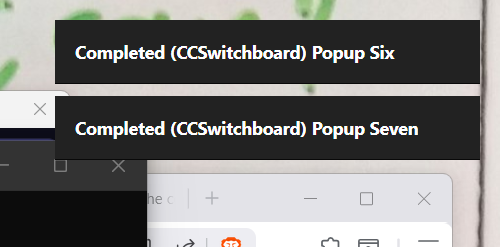
A small tray app on the host machine. When a job finishes it shows a notification in the top-right corner; click it and it raises Brave and focuses the exact tab that dispatched the job. It only pops for jobs marked final, so intermediate steps stay quiet.
How it talks
- Polls
GET jobs.php?status=doneevery 3s and pops a notification only for jobs flaggedfinal. - On click it raises the Brave window, then
POST focus_request.phpwith the thread name so the extension focuses the tab that fired the job.
The feed
A page on the relay. A terminal that is not a terminal.
feed.php?job_id=X renders a live Claude Code run as styled HTML, not as raw terminal text. Because Claude Code emits structured stream-json, the feed can show tool calls as cards, code as code blocks, and thinking collapsed away.
How it talks
- Polls
GET output.php?job_id=&after=every 1s, asking only for lines newer than the last one it drew. - Polls
GET status.php?id=every 2s for the run's live status header.
Read the grid top to bottom and the shape falls out: five parts, one relay in the middle, and every arrow is a poll on a timer. That single constraint - shared hosting cannot push, so everything asks - is why the whole system looks the way it does.